... newer stories
Freitag, 16. November 2007
Screen Design
pepperpotproductions, 02:02h
Our game mainly has a third person screen design. The character is seen from behind in a medium shot, so that the player can observe the locations in front of Dorian. Thus it’s easy to direct him into the right direction. Only if Dorian is speaking to another person, the position switches from third person into first person.
At the top of the screen there are several icons to click on or to notice the current status. At the right hand side you will find following icons: a backpack, a puzzle fragment, a male silhouette, a diary and a lung. At the left hand side a map is situated.
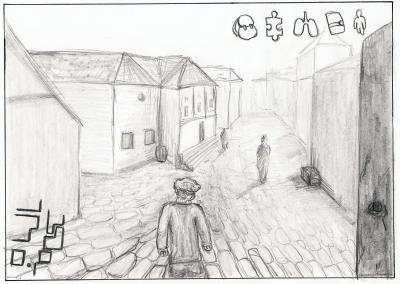
BACKPACK: All useful objects, which can help Dorian to solve the family mystery, are in this backpack. For example: slingshot with pebbles, lantern, pen or crayon, …
PUZZLE FRAGMENT: When clicking on the puzzle fragment, the player has the opportunity to have an overview of how much pieces he has collected yet and how much he still has to find. Moreover he can try to put the existent pieces together.
MALE SILHOUETTE: The more tasks Dorian has achieved, the more this silhouette is filled with colour. At the beginning the silhouette is small and it gets filled rather fast – in younger years you learn very easy. When the figure is filled up completely, the player gets into the next level. Then the silhouette gets bigger and furthermore it gets more difficult to fill it up with knowledge and experience again. This will go on two or three times more – until the character has reached his maximum age and so has solved the family mystery.
DIARY: The diary should provide a review at the so far completed quests. So if the player hasn’t played for some days, he can look up in the diary, what next steps he will has to do.
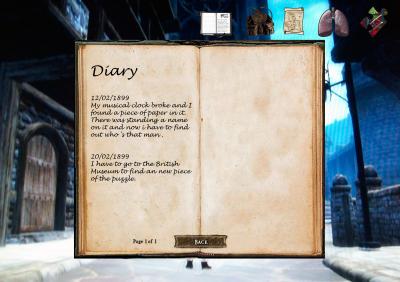
LUNG: The lung only appears, when Dorian is running. If he runs in an average tempo the air in the lung decreases only slightly. But if he runs very fast and long distances, the air also runs out even earlier. When there is no more air left, he has to stop to draw breath again.
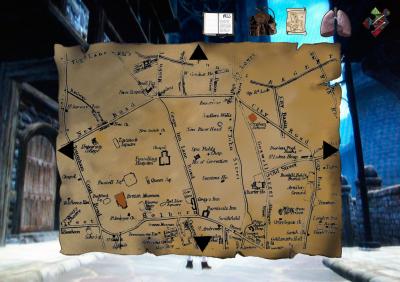
MAP: To give an overview of the landscape and the city of London, a map is situated at the top left corner of the screen. When clicking on it, it gets bigger and then you can navigate through tugging the mouse. With a reading-glass it’s possible to scale up or down.
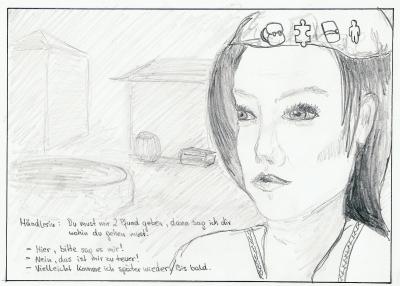
In a situation in which you(the avatar) is speaking to somebody, you have a closer look of the character in front of you.
At the top of the screen there are several icons to click on or to notice the current status. At the right hand side you will find following icons: a backpack, a puzzle fragment, a male silhouette, a diary and a lung. At the left hand side a map is situated.
BACKPACK: All useful objects, which can help Dorian to solve the family mystery, are in this backpack. For example: slingshot with pebbles, lantern, pen or crayon, …
PUZZLE FRAGMENT: When clicking on the puzzle fragment, the player has the opportunity to have an overview of how much pieces he has collected yet and how much he still has to find. Moreover he can try to put the existent pieces together.
MALE SILHOUETTE: The more tasks Dorian has achieved, the more this silhouette is filled with colour. At the beginning the silhouette is small and it gets filled rather fast – in younger years you learn very easy. When the figure is filled up completely, the player gets into the next level. Then the silhouette gets bigger and furthermore it gets more difficult to fill it up with knowledge and experience again. This will go on two or three times more – until the character has reached his maximum age and so has solved the family mystery.
DIARY: The diary should provide a review at the so far completed quests. So if the player hasn’t played for some days, he can look up in the diary, what next steps he will has to do.
LUNG: The lung only appears, when Dorian is running. If he runs in an average tempo the air in the lung decreases only slightly. But if he runs very fast and long distances, the air also runs out even earlier. When there is no more air left, he has to stop to draw breath again.
MAP: To give an overview of the landscape and the city of London, a map is situated at the top left corner of the screen. When clicking on it, it gets bigger and then you can navigate through tugging the mouse. With a reading-glass it’s possible to scale up or down.
In a situation in which you(the avatar) is speaking to somebody, you have a closer look of the character in front of you.
... link (1 Kommentar) ... comment
... older stories